
VoIP phone systems
For some time now, businesses and entrepreneurs have been switching from telephone services using the PSTN (Public Switched Telephone Network) to a more advanced system: VoIP telephone service. This service uses the Internet connection to make voice calls, using packet-switched technology.
VoIP telephone service is very simple. You can make and receive calls over the Internet – a revolution in voice communication! It’s also cost-effective and offers spectacular mobility. The phone number you purchase can be used from any compatible device, such as your desktop, laptop, and mobile devices. Your number stays with you wherever you are. So, if you have access to the Internet, you can use the service.
When you first discover it, you think it might be a complicated system, but it’s not. All you must do is pick up your phone and dial the number you want to call. The same process for receiving the call: your phone will ring, and you just must pick it up or press the talk icon.
In addition, most of the features of the old methods are still present in the VoIP phone service. Voicemail, hold, call forwarding to an alternative number and IVR systems are also available in VoIP. Even faxing, which is no longer a widely used method, is a feature of VoIP systems.
What is a VoIP Phone?
In general terms, a VoIP phone is a phone that connects to the Internet to make and receive calls. If it uses SIP or similar protocols it can be called a VoIP phone.
Most people think of VoIP phones as desktop phones with IP standards for audio communication, but other types of devices such as computers or smartphones can serve the same purpose.
If we want to make a slightly more technical definition, we can say that a VoIP phone picks up the sound it generates through its microphone and converts it into a data packet. From there it sends it through the network. On the other side, the receiver decompresses all the data sent and plays it back so that the other person can listen to the message.
Regardless of the type of telephone system you have in your office or home, the device is still an essential part of it. Whether your company has already switched to VoIP or is considering the switch, you will find that you still need phones to make calls. Unlike the traditional PSTN network, a VoIP phone offers many possibilities in terms of the device used to make and receive calls.
Differences between VoIP and PSTN
Even though they see the advantages of Internet-based telephony, such as VoIP, many companies are still tied to their PSTN telephone systems. Most of them do so based on the idea that they need an independent system, in case the Internet goes down.
However, if a problem arises there are many ways to continue connectivity to your VoIP system:
- Route calls to different phones, including mobile phones.
- Test the uninterruptible power supply.
- Have an alternate service provider.
- Have a backup connection between your private phone and the Internet.
Just by choosing one of the above options, you will be able to have an improved PSTN system that is just as secure.
With this concern solved we think it is convenient that you know the benefits that VoIP technology can bring you:
- Improve your productivity.
- You will have greater scalability. You will not have to worry about adding or reducing lines.
- It will increase your mobility. You don’t have to be in a fixed location, unlike PSTNs.
- VoIP systems allow you to avoid unnecessary payments. You only pay for what you are using.
Types of VoIP phones
VoIP handsets come in all shapes and sizes. Some do not even have a physical component, and you may even see several types of VoIP phones in the same office or company.
Most people like to choose a specific VoIP device based on their own preferences and needs. There are two types of VoIP phones: softphones and desktop phones.
Softphones
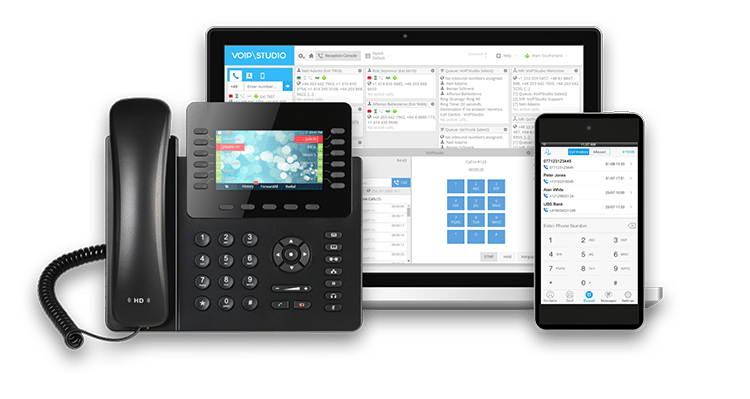
In this case, there is no physical device. A softphone is a conventional software program or app. Many VoIP providers offer dedicated applications for various platforms such as Windows, Android, iOS, etc.
In contrast, other service providers do not have their own dedicated application but allow users to install any third-party software of their choice. The user can access their VoIP account with the third-party software appropriate credentials and make calls from any application and device of their choice.
This means that a VoIP phone can refer to an iPhone with the VoIP application installed or a Windows desktop computer that has the VoIP program running and a headset for calls. The same person can choose to use both, depending on the situation, as well as connect multiple devices to the same number.
A group of people or a team can also share a specific VoIP number. Most service providers do not charge extra for the softphone application, you only pay for the minutes you use.
Desk Phones
On the other hand, there are desktop IP phones that look like traditional office phones. They are dedicated instruments with high-quality components for audio transmission.
They offer higher call quality and reliability.
Note that these phones are independent of your PC. This can be a great advantage, as their operation does not depend on the malfunction of your computer. In this case, a malfunction of your computer will not interfere with the call and you will still be able to use the IP phone.
An IP phone can cost between 30 and hundreds of dollars, depending on the quality and the availability of expansion modules.
Differences between VoIP desk phones and traditional phones
The physical differences between VoIP desk phones and traditional desktop phones are almost negligible. You will probably hardly notice the difference between a VoIP phone and a desktop phone on the outside.
The physical characteristics of VoIP phones are the placement of the buttons, the location of the speakers, and they often have headsets. In other words, they are very similar to conventional desk phones. Even the keypad is almost identical. Both have the possibility of numeric dialing and letters for alphanumeric dialing.
Apart from the above mentioned, VoIP phones have special buttons for dialing: redial, transfer, conference, hold, mute, or voicemail are some of the most used functions with their own button.
Another advantage is that VoIP phones are capable of high-definition voice output when other phones used in the company are not. Still, the factors that we consider most important about these phones are the power supply and their access to the Internet.
VoIP phones and landline phones have some notable differences. As mentioned above, the power supply to the telephone network, the way they work, and call handling are some of them. Here are a few more:
- Use of the Internet to connect to the telephone network.
- Need to register online with a service provider.
- Your number will be linked to your account and not to a real phone number.
- VoIP phones have buttons that allow you to switch between simultaneous calls and are capable of high-definition voice.
- Power over Ethernet (PoE) allows some VoIP phones to receive power from a PoE switch.
It is also worth noting that there are many similarities between the two:
- Both phones share the same keypad.
- Compared to office phones, they have the same buttons for specific actions (call transfer, call hold…).
- Physically, both have a very similar design.
- Both have headsets, receivers, loudspeakers, and other elements necessary for communication.
To sum up, we can conclude that VoIP phones are not going to be a problem for you if you have previously used office phones. Although they have different options, their use is very similar.
Components of a VoIP desk phone
A typical VoIP desktop phone has both hardware and software components. The software consists of network components, VoIP protocols, media stream management protocols, etc. Hardware components include:
- Speakers and microphone.
- Keyboard or touchpad.
- Display, typically an LCD screen.
- Signal and general-purpose processors.
- Speech-to-digital and digital-to-speech converters.
- Ethernet port or wireless network card
- A power source (either battery, power over Ethernet, or charging cable).
All VoIP phones do not necessarily have to have all the above components. If your device supports PoE (Power over Ethernet) you do not need a separate power supply. Also, some stand-alone units used in public places, such as a hotel lobby, may not have a keypad.
Conference terminals may have several high-quality speakers and microphones but need a separate display connection for messaging.
You can also have cordless VoIP phones designed to give you complete freedom of movement by allowing multiple VoIP phones to operate from a single base.
How does a VoIP phone work?
If we compare VoIP technology with the PSTN network, we can say that both have the same mission: to carry voice data from one person to another. So, what’s the difference?
The difference is not in the objective, but in how it achieves that objective. The PSTN carries voice signals over copper lines (or, more recently, ISDN digital circuits). Since the first telephone conversations, the PSTN infrastructure has been continuously expanded to connect more users and households to the network. Physical wires must connect to each telephone to make a call.
One advantage of VoIP technology is that it does not need its own physical infrastructure. Its protocols convert voice signals into data packets and transmit them over the Internet via fiber, cable, or even satellite.
Once converted into data, the protocol can handle it like any other communication medium, such as a picture, a song, or a text document. As such, VoIP is more like the way music streaming works than any existing telephony standard. Therefore, users can make VoIP calls through any provider of their choice, just like listening to Spotify or other music streaming services.
It doesn’t matter if you use a smart speaker or a web provider. You can listen to your music from anywhere there is an internet connection. VoIP works on pretty much the same principle and uses some IP-based protocols such as SIP, UDP, RTP, SDP, etc.
VoIP phone features
A VoIP phone has a lot of features, which will depend a lot on the model and type of handset you choose. There is a wide variety of models of VoIP desktop phones in the market to choose from.
To give you an example, here are the features we consider to be optimal for an entry-level CISCO model:
Cisco CP-6851
This is a basic SIP-based feature phone for small businesses. It is very easy to use and has cross-platform support. Its design is attractive and ergonomic.
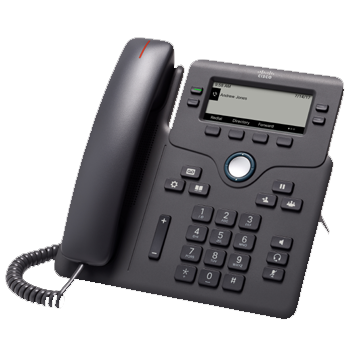
Some of its main features are:
- 3.5″ (396 × 162 pixels) white backlit grayscale display.
- Gigabit Ethernet 10/100/1000 switch.
- Headset support: RJ9 wired connection and EHS wireless headset support (requires EHS adapter).
- PoE support.
- Four SIP accounts.
- Hands-free talking (speakerphone).
- Wall mount (optional wall mount kit available).
- Hearing Aid Compatible (HAC) handset.
- Four programmable function / line keys.
- Four programmable function keys.
- Message waiting and incoming call indicator LED on the handset.
This device is one of many we have available at VoIPstudio.
VoIP conference phones
Conference phones enable users to communicate with partners, suppliers, and others in the company. These terminals allow all users present to participate simultaneously in any conversation.
Conference phones optimize voice quality and enable better collaboration in a range of environments from small conference rooms to executive offices. Offering enhanced voice quality, advanced audio processing, and a host of useful features, they are ideally suited to increase productivity and shorten meeting times.
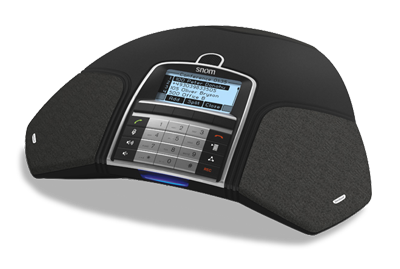
In terms of functionality, IP conference phones typically have three key features:
- Clear voice quality.
- Smooth conversation.
- 360-degree microphone pick-up and group voice pick-up.
Typically, conference phones can pick up sounds from all directions. The device’s speakers are usually pointed upwards, allowing the speakers to pick up voices from around the room evenly, rather than mixing them. On the other hand, the body of the phone usually has a keypad, which can be used for dialing, or an LCD that shows the status of the call.
IP conference phones offer tools aimed at connecting to a network, directly over the Internet, like IP phones. They are often designed to bring participants into a simultaneous call, as there is a bridge that helps users call into the conference by dialing a telephone number and connecting to the bridge.
VoIP accessories
Although a VoIP phone is enough to provide communication via VoIP technology, different accessories allow us to improve its functionality and features. The most common are:
- Adapters: These allow you to easily connect an ordinary analog telephone to a VoIP telephone system. They are mostly used to connect legacy fax machines, alarm systems, etc., which require an “analog phone line”.
- Power supplies: to be used in environments where PoE (Power over Ethernet) is not available.
- Headsets: greatly improve productivity in busy office environments for “hands-free” operation. They also reduce interference from other users around the office.
- Extension Modules: Allows receptionists to monitor the status of other extensions. Useful for call transfer or call pick-up.
VoIP phones pricing
The prices of VoIP phones vary greatly depending on the manufacturers and their features. Among the most reliable manufacturers are brands such as Cisco, Snom, or Yealink.
You can get from a professional cordless DECT phone for as little as $30 to a desktop. to a VoIP phone with advanced features that can reach prices above $500. VoIP PBXs, meanwhile, can cost from $100 or $150 in the basic range to over $1,500 for the most advanced versions.
If you want to buy high-end VoIP phones with a good quality/price ratio, you can visit the VoIPstudio store.
Setting up a VoIP phone
Setting up a VoIP phone is quite simple. Just follow the manufacturer’s instructions. In most cases, it can be summed up in a few simple steps:
- Connect the handset: Once you have unpacked the phone, plug the handset into the handset port.
- Connect to Ethernet port: Find an Ethernet outlet and connect it to the IP phone.
- Power cable: connect it to the IP phone. If your unit supports PoE, you will not need to connect it.
- Locate your IP address: go into the interface and find your IP address.
- Enter the credentials: enter the IP address in the search bar in any browser. It is usually very simple but is always better to check the VoIP phone user guide.
- SIP provider: check with your VoIP provider for details of your SIP username and password and enter them in the appropriate areas.
- Check that your VoIP phone can make calls.
Some providers, such as VoIPstudio, provide fully pre-configured VoIP phones to their customers when they purchase phones through their online shop. This makes the process as simple as plugging in the phone and start making and receiving calls immediately.
Tips for choosing your VoIP phone
The first thing you should look for before deciding on a particular model is the features that best suit your needs, as there are much more advanced handsets for people who need more features.
The brand can be another determining factor when choosing a phone. We work with Cisco, Fanvil, Grandstream, Yealin and Snom.
Also when choosing your phone you should consider if you need to manage multiple lines with each device or if PoE (Power over Ethernet) is an important feature for you.
All these details can be found in the product sheets of each phone. Take your time to study the features of the one you are going to buy and think about both your current and future needs.
It will always be better to buy a VoIP desktop phone that gives you options for the future.
Buying dozens of IP phones for your business can easily cost thousands of dollars. You may wonder if the cost is worth the benefits you will receive. In this case, the answer is not a resounding yes or a resounding no. It all depends on your particular situation, your business and the benefits you will receive. It all depends on your particular situation, your business needs and your budget.
Many small businesses opt for a PC softphone or mobile applications for most employees. They only need to purchase desktop phones for executives or managers who need the extra functionality.
Dedicated IP phones tend to have higher quality components, especially when it comes to speakers and microphones. Calls can be heard better on IP phones than on smartphones or computers.
Most desktop phones come with function buttons that may also be programmable in some cases. You can assign these buttons to frequently used actions or functions, which will allow more flexibility than softphone applications.
It should be noted that many VoIP applications cannot support advanced features, as they have to work well on small screens without specific hardware for calls.
VoIP phone as an element of your cloud ecosystem
Regardless of the type of VoIP phone used (Hardware IP Phone or PC Softphone), thanks to telephone calls being part of a data network, the possibilities for integration and interaction with third-party IT systems are endless.
Integrations
VoIPstudio allows the integration of the telephone system with external CRMs and with other IT systems. The integration of telephone communications with technology systems is known as Computer Telephony Integration (CTI). It improves productivity and user experience, among other things.
On many occasions, our clients come with previous programs, which they are interested in integrating with our system. From VoIPstudio we have detected this need and we have focused all our efforts on it.
As we have seen in previous points, it seems essential to us to facilitate the integration of our system, so we believe that the more integrations we can do, the better. We have partnered with large companies, so many of our customers can integrate our service with their CRM.
Some of the options with which our application can be integrated are:
- REST API
- Webhooks Events
- Google Chrome Extension
- Zapier
- TaxiCaller
- Zoho
- simPRO
- Salesforce CRM
- Microsoft Dynamics CRM
- Oracle Sales Cloud
- Connector CTI
- SIP TAPI
Want to experience the benefits of VoIP first hand? Start a 30-day free trial now!