AI - Artificial Intelligence - CX Add-on
Unlock deeper call insights and improve your customer experience by upgrading as many user seats as you like with our new CX Add-on. This add-on to a Core user seat offers advanced AI-powered tools in addition to our full business communications suite.
You can invite team members and assign or remove CX Add-ons from Users in the Dashboard at any time – only the assigned add-ons will appear on your invoice. Unlike many competitors, we don’t insist every User in your account is upgraded with this add-on package – only those who need it. This lowers your costs and adds features where you need them.
Voipstudio's AI-powered CX features transcribe call recordings and analyse what was said during the call using the resulting text transcript. Depending on the features enabled for your account, AI can generate call summaries, suggest follow-up actions, and provide CX analysis, including CX Score, to help surface how a call went for the customer.
These features can help businesses understand customer interactions, identify follow-up actions, and review communication and customer experience across their calls.
Key Capabilities:
- Automated call transcription with clear speaker identification and timestamps.
- AI-generated summaries with key points and action items.
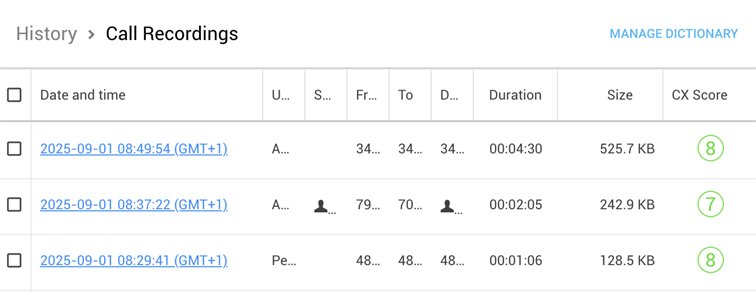
- CX Score (1-10) assigned to each call to evaluate customer experience and call effectiveness.
- Export options for summaries and actions in PDF.
- Custom dictionary of terms for you to identify important words or proper names for better context and accuracy. Such terms will appear bold in call transcriptions and summaries.
Understanding Customer Experience Score
The Customer Experience Score or CX Score provides an objective 1-10 rating based on measurable aspects of customer interaction.
Criteria for CX Score
The 1-10 score is assigned to each call based on the following criteria:
- Clarity & Understanding – How clearly both parties communicated.
- Response Time & Call Flow – The smoothness of the conversation.
- Engagement & Professionalism – Level of engagement and professionalism.
- Resolution & Effectiveness – Whether the call met its intended outcome.
- Customer Effort & Call Efficiency – Ease of understanding and efficiency of the call.
CX Score Ranges
Higher CX Score indicates more effective and professional interaction, while lower scores highlight areas for improvement:
- 1 – 3 (Poor): Miscommunication, long pauses, unresolved issues.
- 4 – 6 (Average): Functional, but lacking engagement or clarity.
- 7 – 10 (Excellent): Clear, engaging, and successfully resolved interaction.
Upgrading users with CX Add-on
To upgrade user(s) with CX Add-on, follow the steps:
- Go to Admin Dashboard home page > Account Info.
- Click Manage seats next to CX Add-on seats.
- Select users and click Buy seats.
Complete the purchase on the checkout page.
Alternatively:
- Go to Admin Dashboard > Users.
- Select users to upgrade with CX Add-on.
- Click the CX icon and select Buy CX Add-on seats for selected users.
Complete the purchase on the checkout page.
To remove CX Add-on from user(s):
- Go to Admin Dashboard > Users.
- Select users to remove the CX Add-on package from.
- Click the CX icon and select Remove CX Add-on from selected users.
Confirm your action to remove CX add-on from selected users.
Accessing AI-powered call analysis tools
You can access AI-powered call analysis tools through the History > Call Recordings menu. Access to AI insights and call transcripts is restricted based on a user role. Only users with the necessary permissions (i.e. Supervisors) can view AI-generated summaries, transcripts, and CX Scores.
Call Summaries & Actions
To access AI-powered call insights, such as summaries and actions, follow the steps:
- Go to History > Call Recordings.
- Select a call by clicking on its date and time or the AI Insights button.
- On the AI Insights page, locate the Summary & Actions section.
- View the AI-generated call summary, notes and action items.
- Use the export options to download summary in PDF.
- Click the Copy button to copy summary to clipboard for easy sharing.
Call Recording & Transcript
To access call recording and transcript, follow the steps:
- Go to History > Call Recordings.
- Select a call by clicking on its date and time or the AI Insights icon.
- On the AI Insights page, locate the Recording section.
- Listen to the call recording and view the transcript with clear speaker identification, timestamps.
Info
Call summaries, actions and transcripts are only generated for calls longer than 30 seconds. However, you can still listen to call recordings under 30 seconds.
Dictionary
You can identify a global dictionary of important terms for better context and accuracy during AI analysis. Such terms will appear bold in call transcriptions and summaries.
To access and manage the dictionary, follow the steps:
- Go to History > Call Recordings.
- Click Manage Dictionary.
- In the dialogue window, enter a term and click Add. The term will appear under Dictionary Terms.
- You can edit or delete any added terms, using the appropriate buttons.
- Dictionary terms will be listed on each call’s AI Insights page, under the Dictionary section.
Data retention
Some data is retained at account level, while other data is retained per user.
Account-level retention (one CX Addon allocated to any user in the account)
A single active CX Addon enables 5-year retention for account-wide data, including:
- Volumetric data, such as Call Detail Records (CDRs)
- SMS messages
- Fax messages
Because these are account-level capabilities, only one active CX Addon is required for the entire account. This can reduce your costs if you only require minimal data retained and do not require full per-user voice conversation retention and CX capabilities.
User-level retention (CX Addon required for each user)
Features relating to an individual user's voice recordings and transcriptions require each user to have a CX Addon assigned to benefit from 5-year retention. These include:
- Voicemails
- Call recordings
- AI transcripts
- AI summaries
- AI action items
- AI keywords
- Customer Experience (CX) scores
If only some users have a CX Addon licence, only those users' conversation data will receive the extended 5-year retention.
Info
Please note: Upgrading to CX Addon extends retention from the date of activation and includes the previous 12 months. It does not restore recordings or other conversation data that was permanently deleted under the standard 12-month retention policy.
Can I mix Core and CX Addon users? Yes. You can assign CX Addon only to the users who need extended conversation retention and AI-powered conversation intelligence, while other users remain on the Core plan. This allows you to tailor licensing to the needs of each team while still benefiting from account-wide features that require only a single active CX Addon.
Security & Compliance
Voipstudio's AI-powered CX features are designed with security, privacy and responsible AI use in mind.
AI call analysis is based on the call transcript rather than the audio recording itself. Depending on the features enabled for your account, this may include automatic call summaries, suggested follow-up actions, CX analysis or a CX Score.
These features are optional, and you decide whether and how to use them within your organisation.
- AI analysis: Voipstudio's CX features analyse what was said during a call using the transcript. The available analysis depends on the AI features enabled for your account.
- Your compliance responsibilities: If you use AI features to analyse calls with customers or review your team's interactions, you should consider the AI, employment, privacy and data protection requirements that apply in the jurisdictions where you operate.
- Caller disclosure: Where applicable, businesses using Voipstudio's AI analysis features are responsible for informing their callers about their use of AI. Voipstudio provides tools to help customers make the appropriate disclosures.
- Role-based access: Access to AI-powered call analysis features can be controlled through user roles and permissions, helping organisations restrict access to authorised users.
Call recordings can be securely retained for up to 5 years with the CX add-on, helping organisations meet their own retention and record-keeping requirements.
For more information about how AI is used within Voipstudio and the responsibilities of businesses using these features, see our AI Transparency Policy.